Dein eigener Renningenieur.Your own race engineer.Immer am Funk.Always on the radio.
Du fragst, er rechnet: Er funkt dir genau das, was du mit 250 km/h nicht selbst ausrechnen kannst – Abstände, Sprit, Boxenfenster und die Kurve, in der deine Zehntel liegen. Du redest mit ihm wie mit einem echten Ingenieur, beide Hände bleiben am Lenkrad. You ask, he does the maths: he radios exactly what you can't work out at 250 km/h – gaps, fuel, pit window and the corner where your tenths are hiding. You talk to him like a real engineer, with both hands on the wheel.
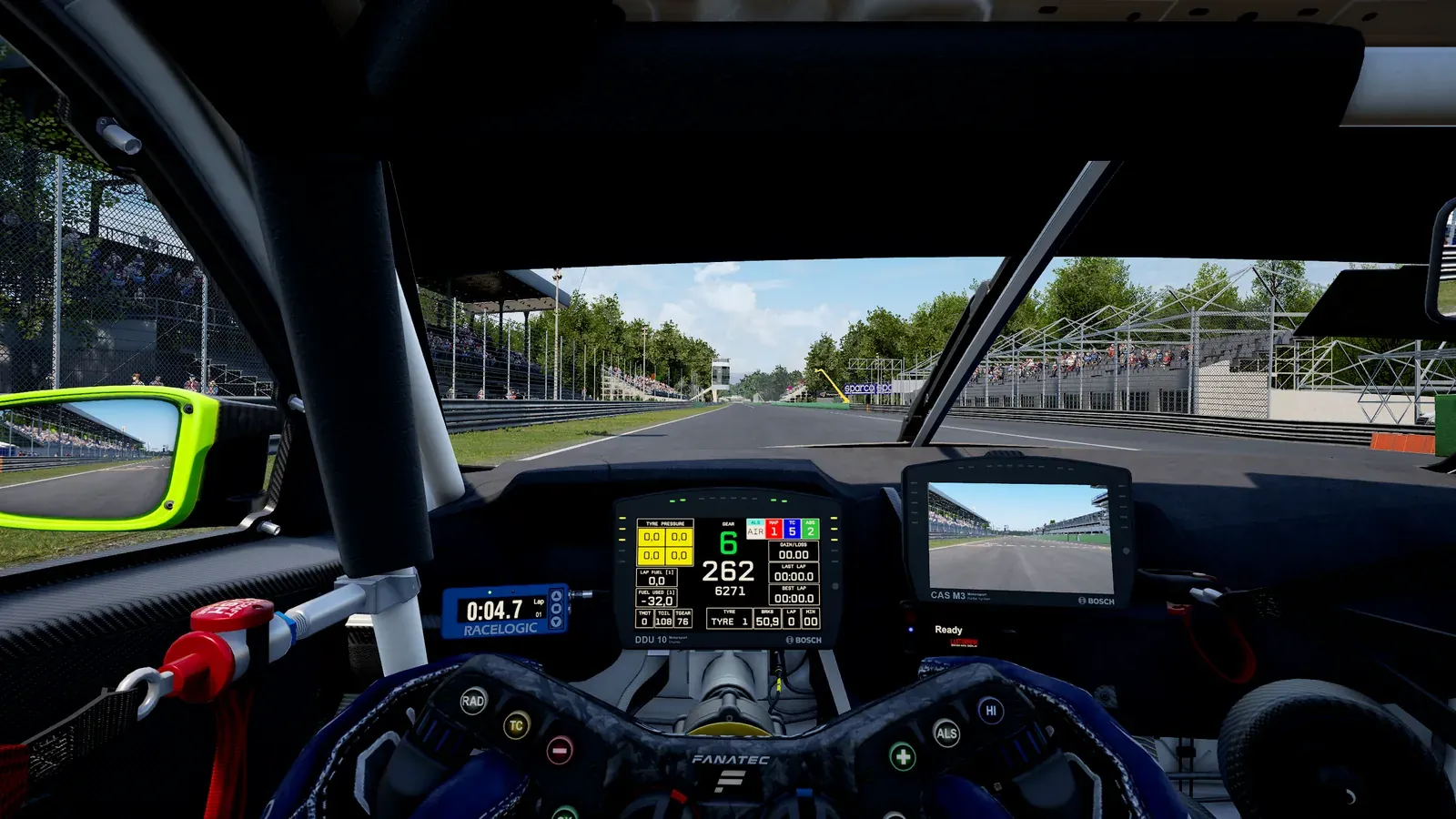
So sieht's ausSee it in action
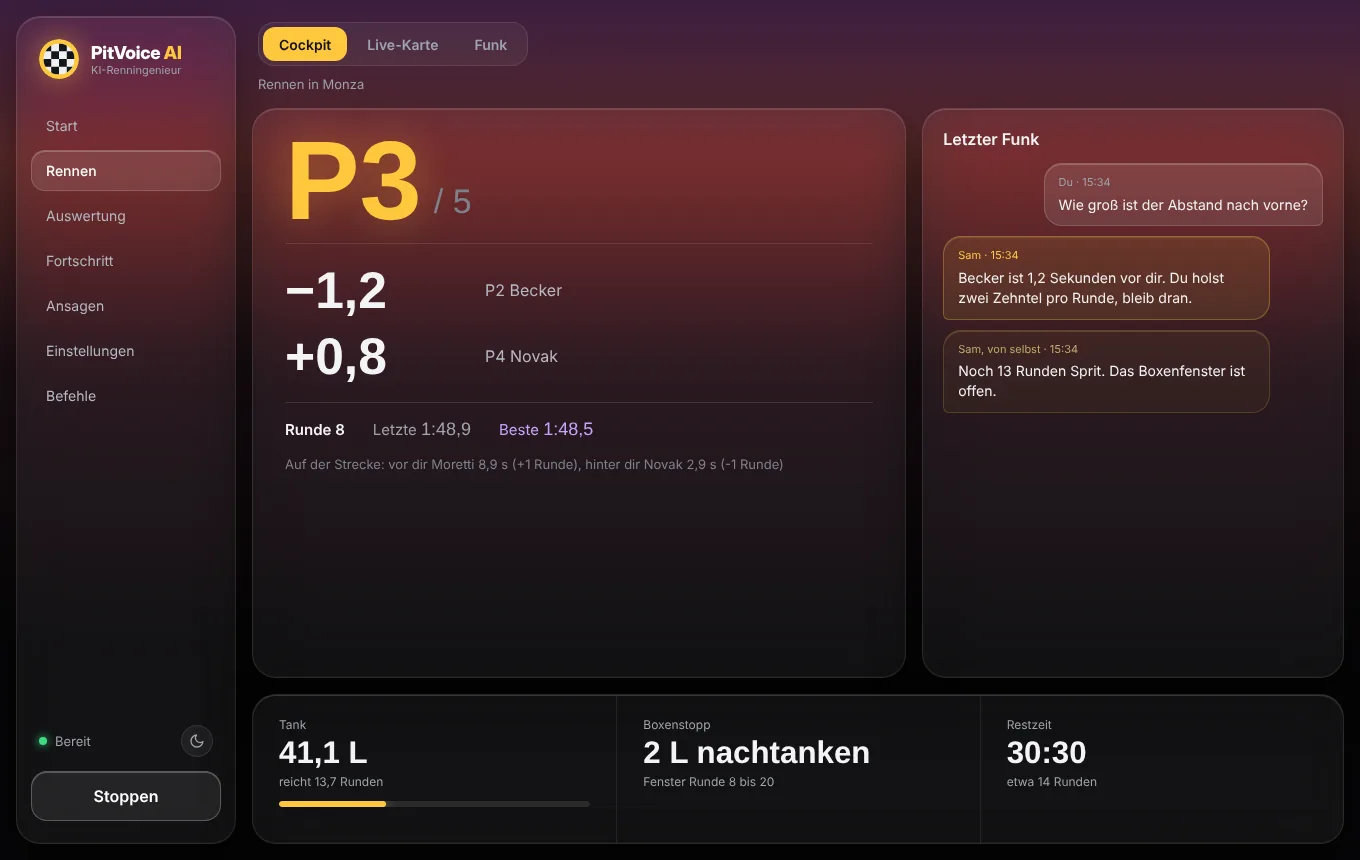
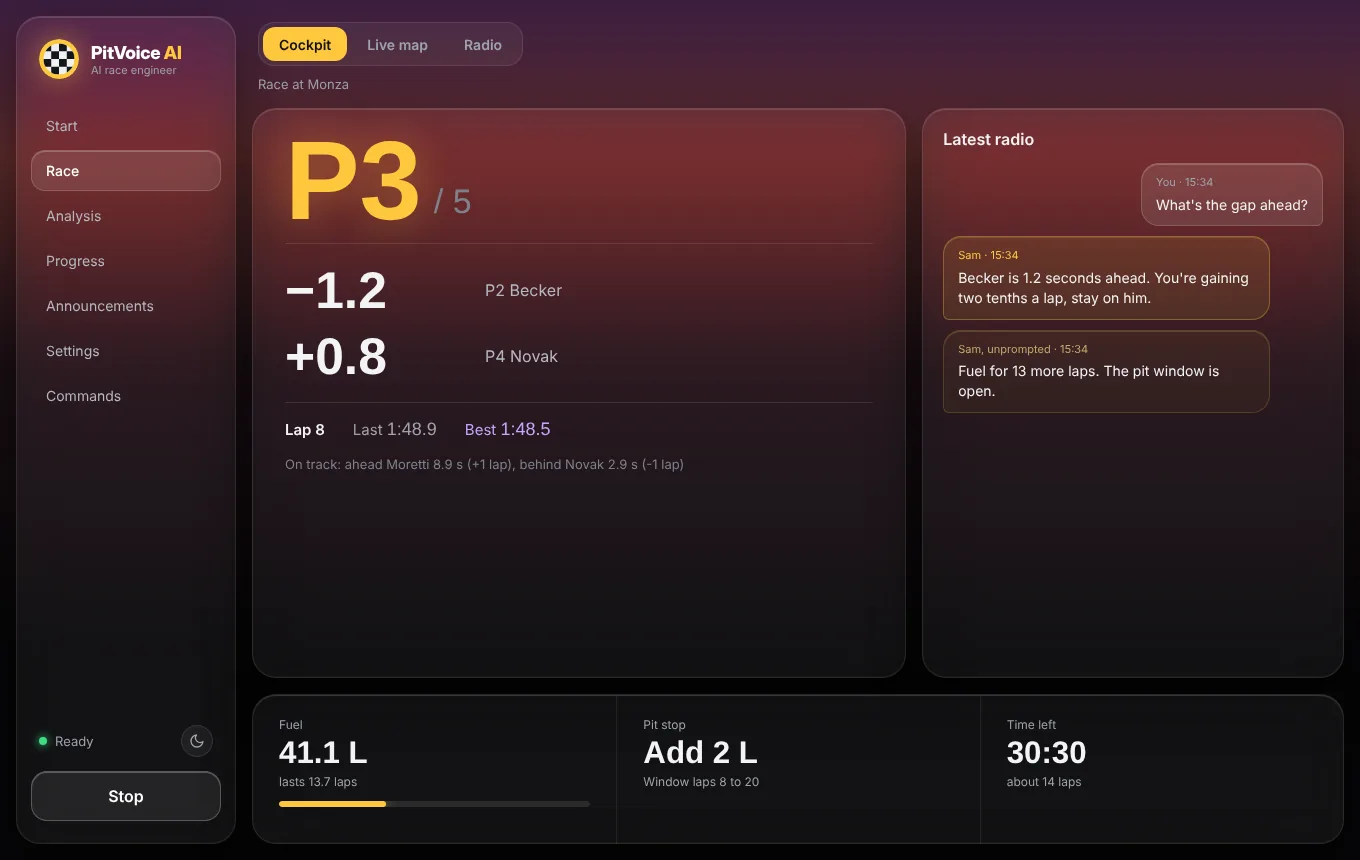
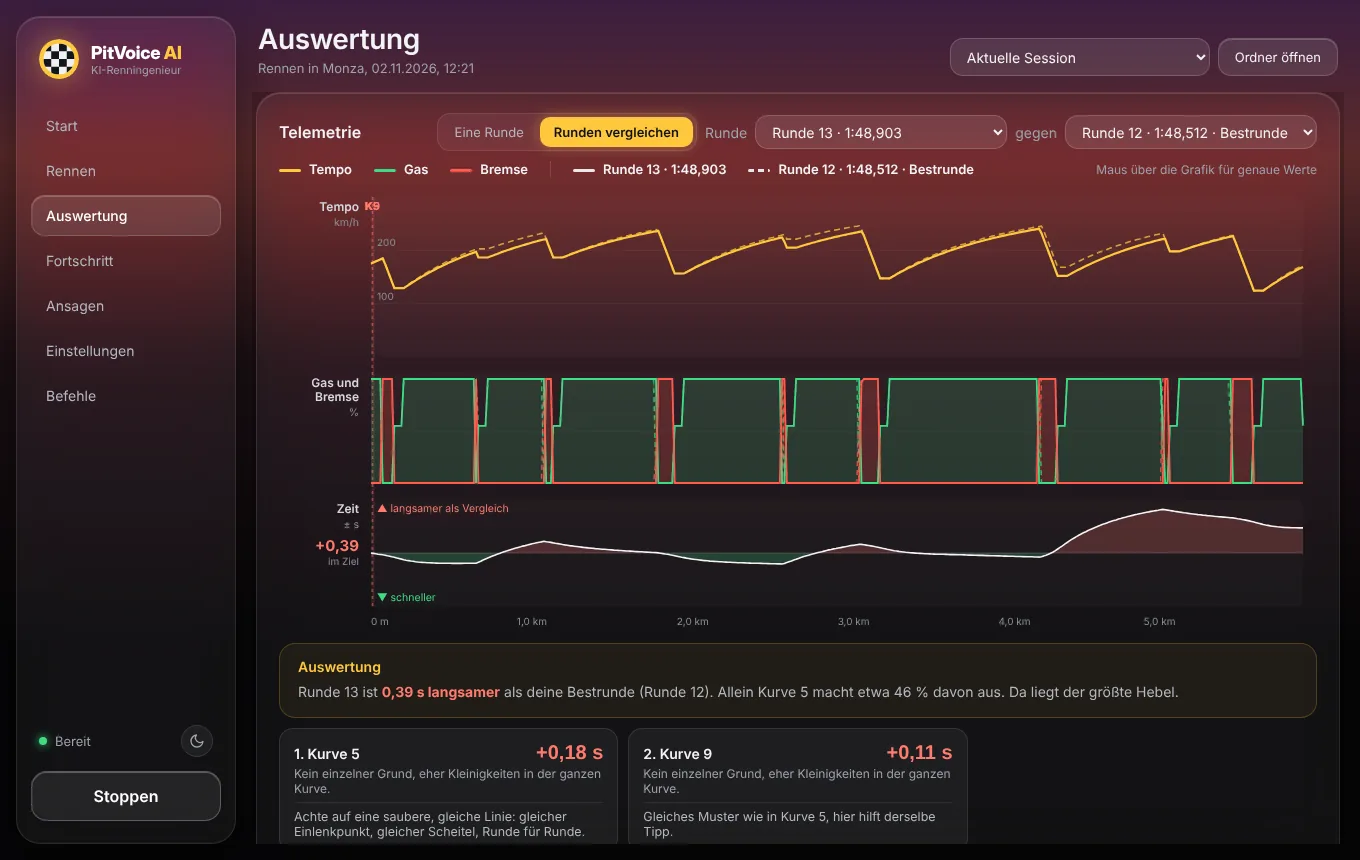
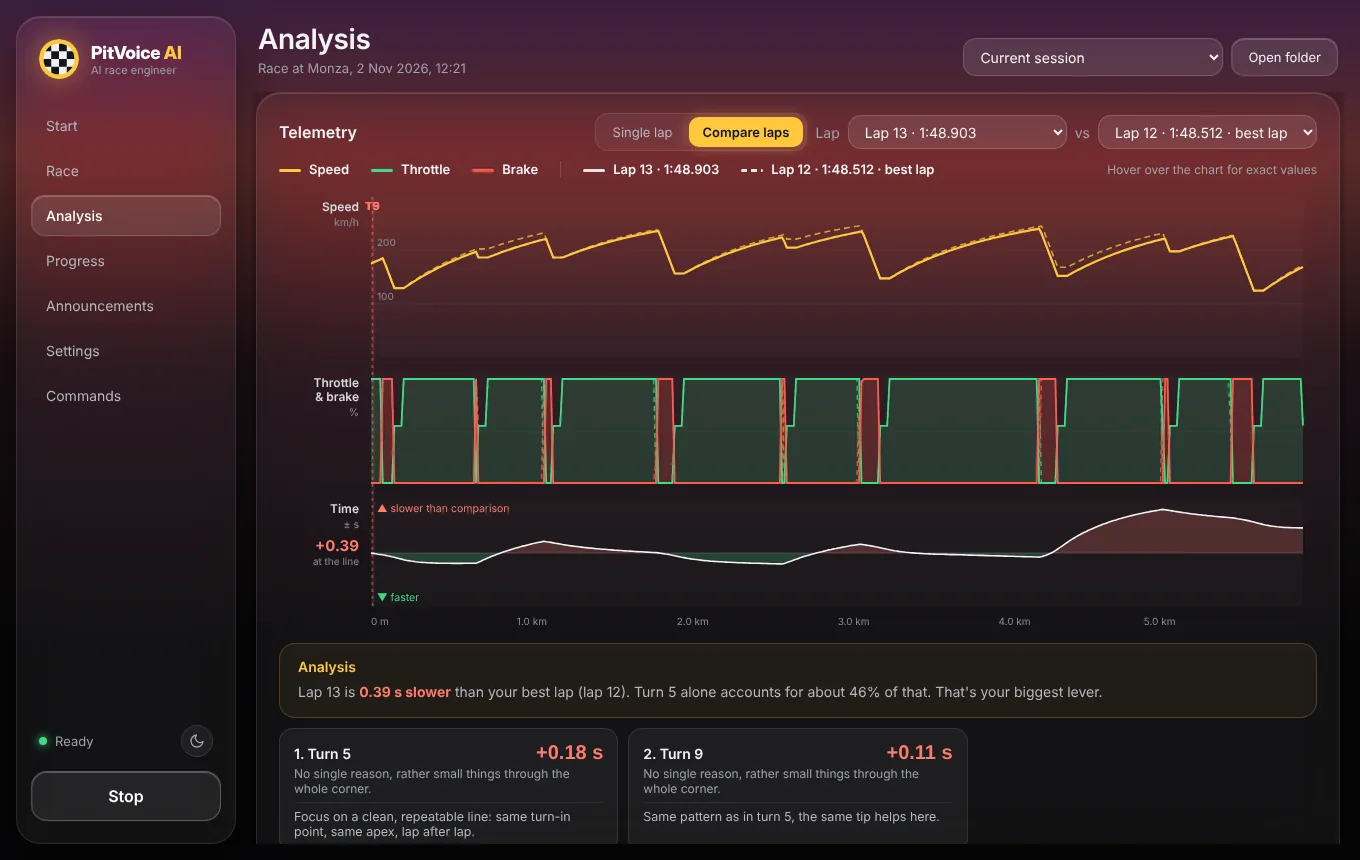
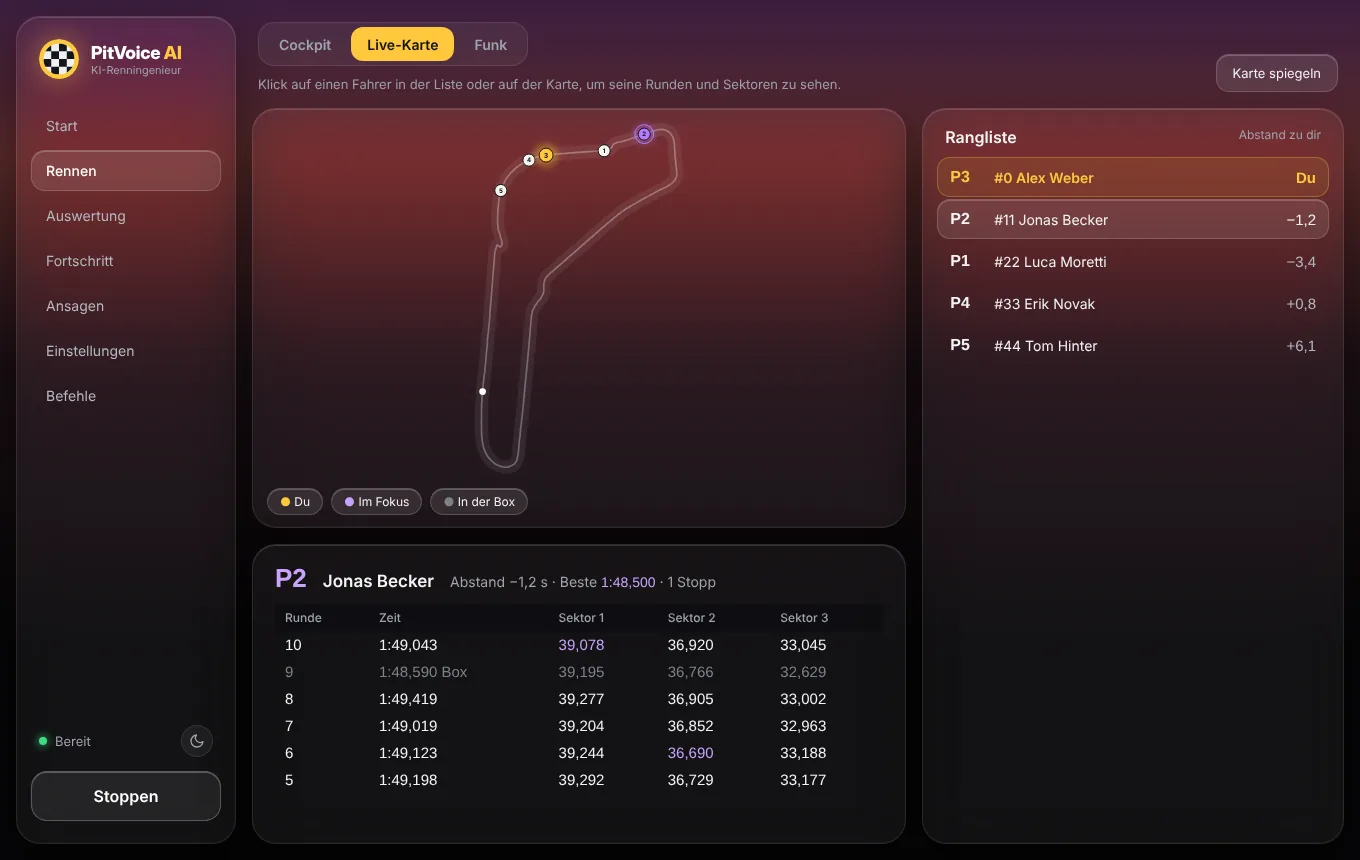
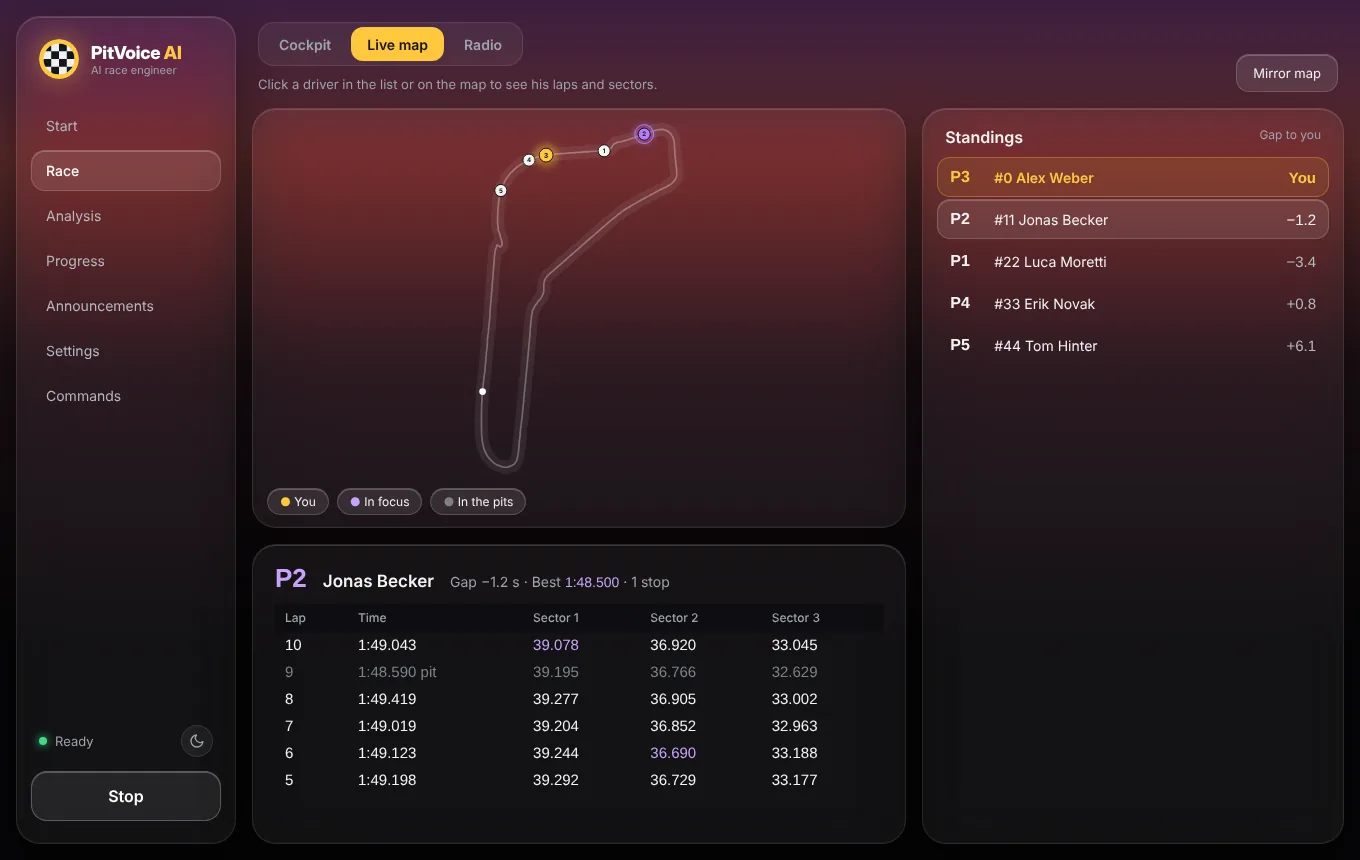
Echte Bilder aus der App, mit Beispieldaten.Real screenshots from the app, with sample data.
Dein zweiter BildschirmYour second screen
Handy oder Tablet neben das Lenkrad, fertig ist das Dashboard. Keine App nötig: Adresse im Browser öffnen, gleiches WLAN wie der PC.Phone or tablet next to the wheel and you have a dashboard. No app needed: open the address in the browser, same Wi-Fi as the PC.
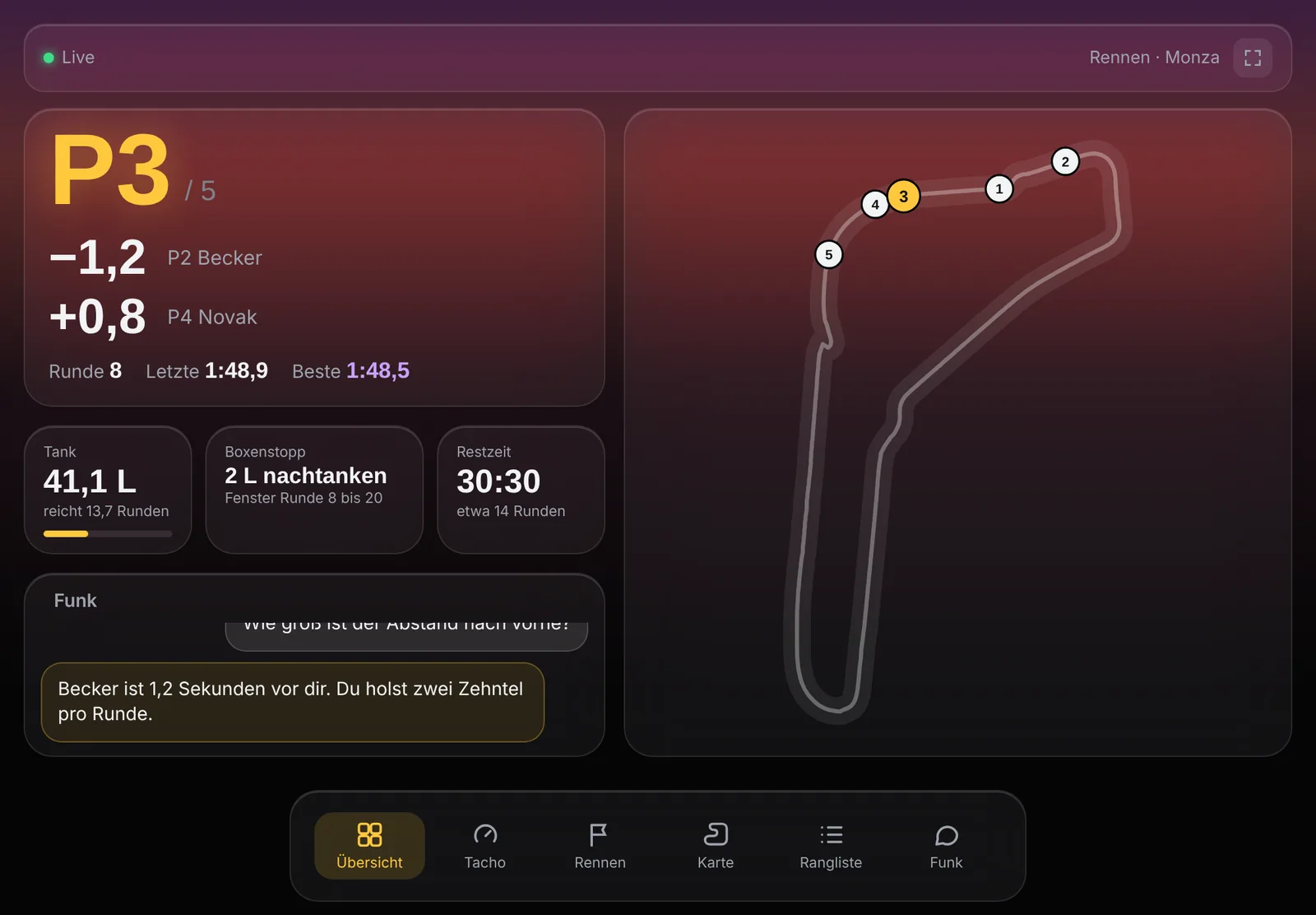
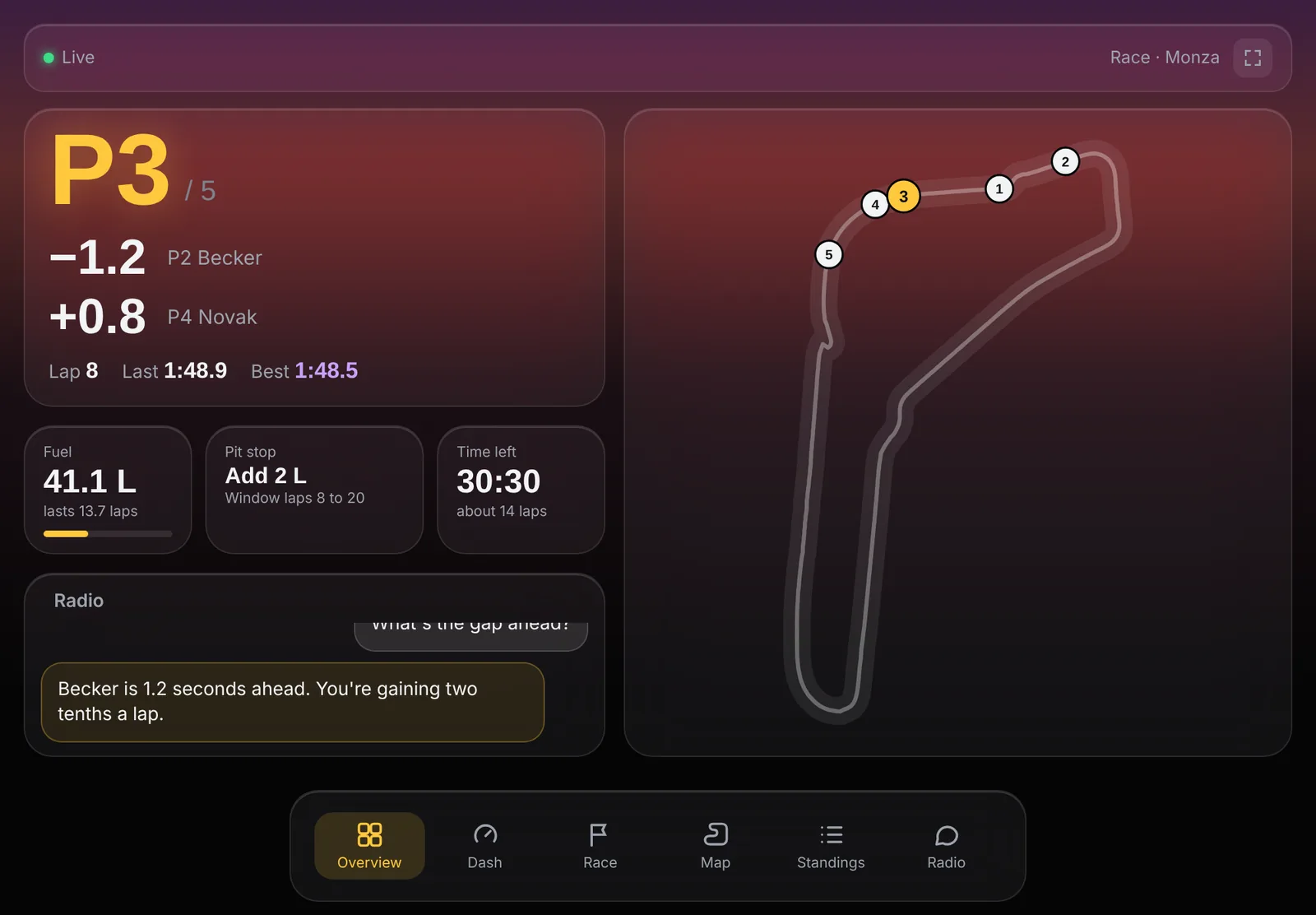
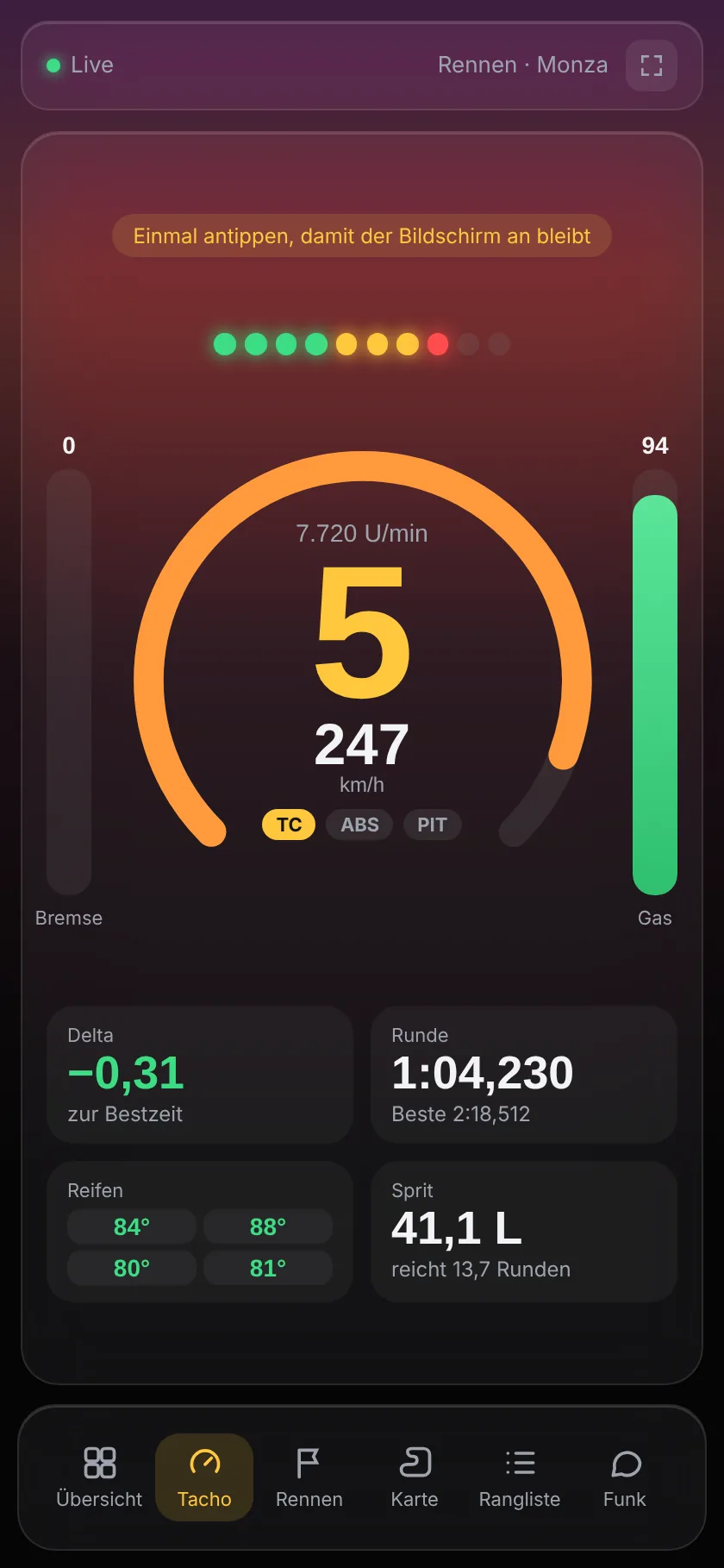
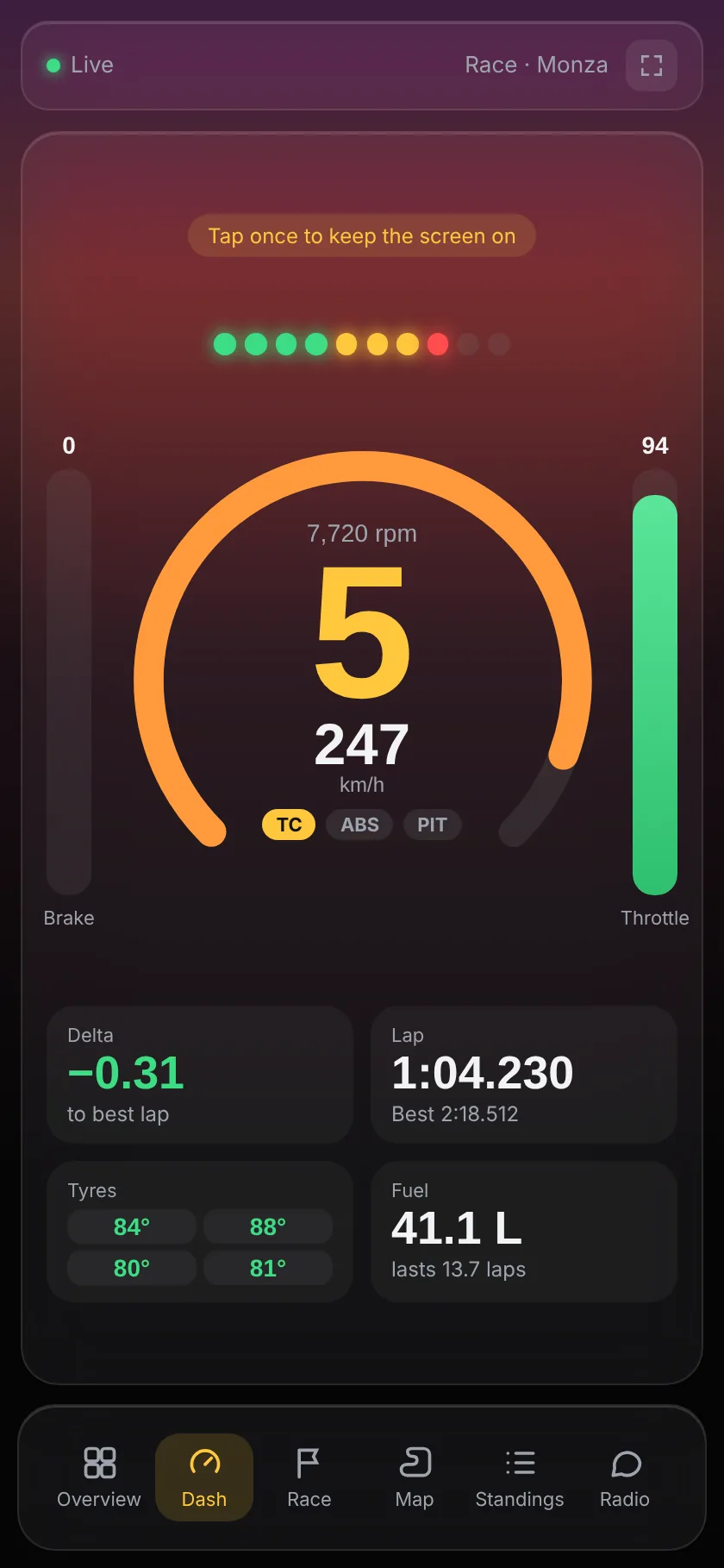
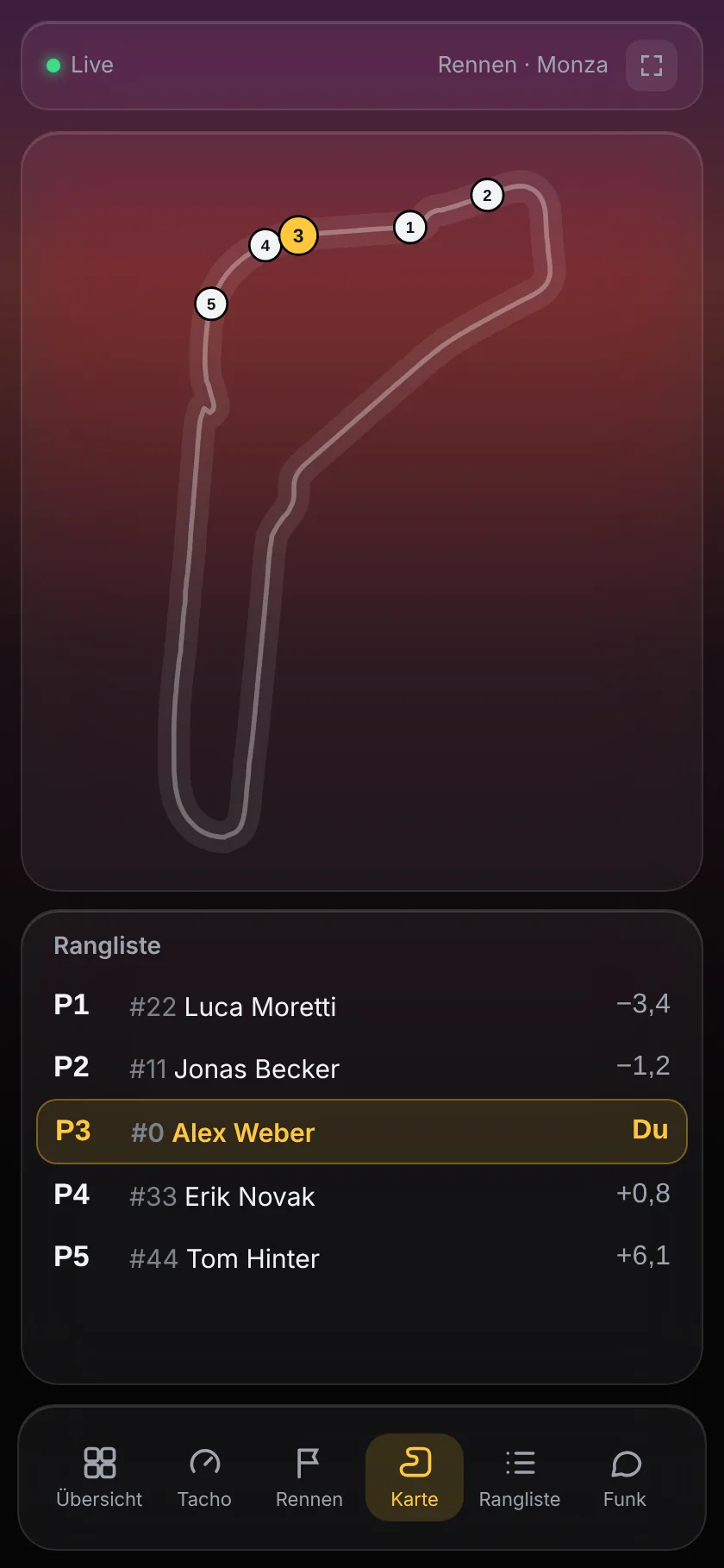
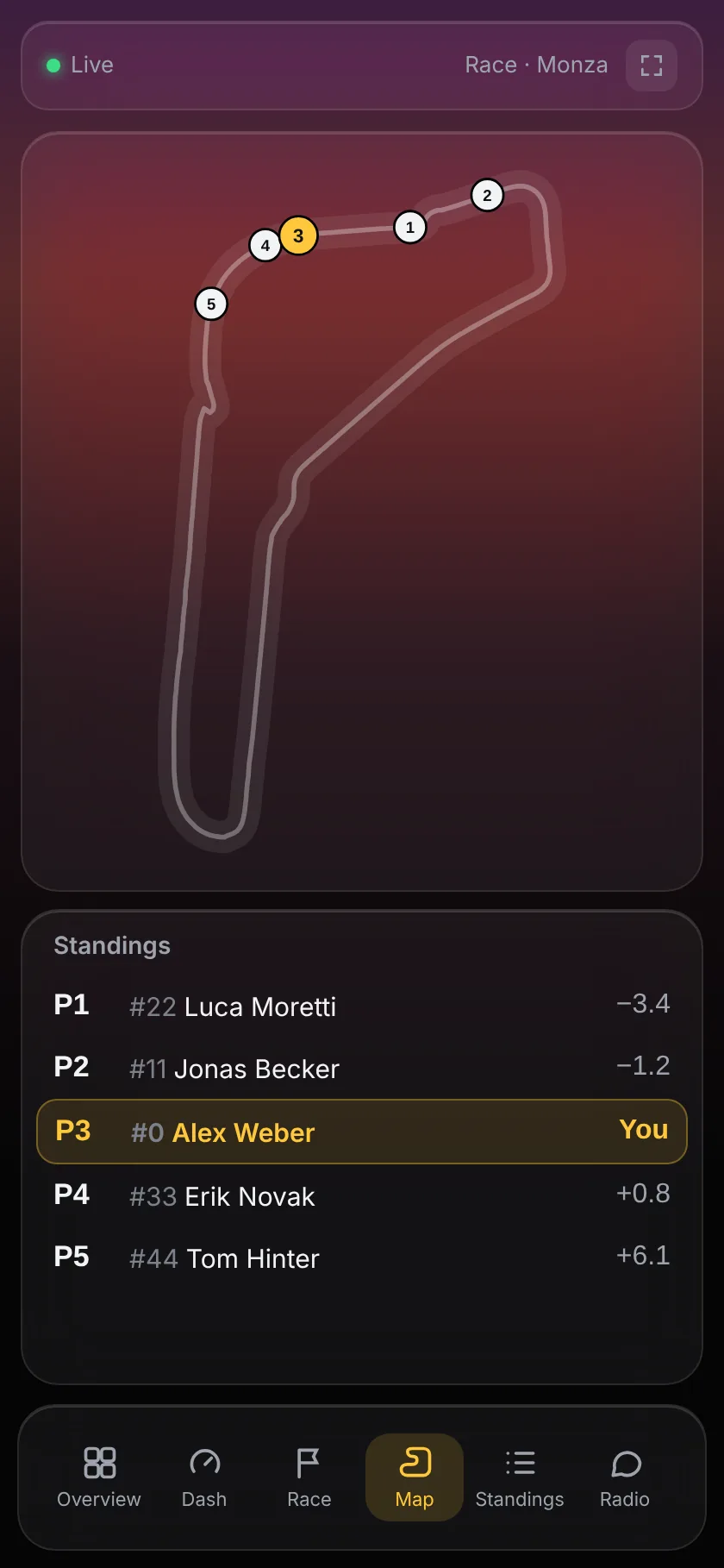
- Sechs Ansichten: Übersicht, Tacho mit Drehzahl, Gang und Pedalen, Rennen, Karte, Rangliste und Funk. Antippen oder wischen.Six views: overview, dash with rpm, gear and pedals, race, map, standings and radio. Tap or swipe.
- Hoch- und Querformat: passt sich Handy und Tablet an, alles auf einem Bildschirm, ohne Scrollen.Portrait and landscape: adapts to phone and tablet, everything on one screen, no scrolling.
- Live: zweimal pro Sekunde aktuell, Vollbild auf Android und Tablets.Live: updates twice a second, full screen on Android and tablets.
Was er drauf hatWhat he brings
Er liest die Live-Daten aus dem Spiel und meldet sich nur, wenn es zählt. Auf der Geraden, nicht mitten im Bremspunkt.He reads the live data from the game and only speaks up when it matters. On the straight, not in the middle of your braking zone.
Frag einfach. Er versteht dich.Just ask. He gets it.
„Wie viel Abstand nach vorne und reicht der Sprit?“ Mit KI versteht er ganz normale Sätze, auch zwei Fragen auf einmal.“What's the gap ahead and will the fuel last?” With AI he understands normal sentences, even two questions at once.
Nie wieder trocken ausrollenNever run dry again
Verbrauch, Boxenfenster, wie viel Liter rein müssen, wo du nach dem Stopp rauskommst, und der Startsprit fürs nächste Rennen.Consumption, pit window, how many litres to add, where you rejoin after the stop, and start fuel for the next race.
Weiß, wer hinter dir Druck machtKnows who's pushing behind you
Wer aufholt, wer abbaut, wer gerade an die Box fährt. Undercut-Warnung inklusive. Und der Spotter sagt dir sofort „Auto links“, wenn jemand neben dir ist.Who's closing, who's fading, who's pitting right now. Undercut warnings included. And the spotter calls “Car left” the moment someone is alongside.
Findet deine verlorenen ZehntelFinds your missing tenths
Vergleicht deine Runden Kurve für Kurve: zu früh gebremst, zu langsam im Scheitel oder zu spät am Gas.Compares your laps corner by corner: braking too early, too slow at the apex or too late on the throttle.
Regen? Er sagt dir, wann.Rain? He tells you when.
Regenvorhersage, der richtige Moment für Regenreifen und der Reifendruck für den nächsten Stint.Rain forecast, the right moment for wets and the tyre pressures for the next stint.
Das ganze Feld im BlickThe whole field at a glance
Live-Karte mit allen Autos, Rangliste mit Sektorzeiten, Overlay über dem Spiel und eine Ansicht fürs Handy.Live map with every car, standings with sector times, an overlay on top of the game and a phone view.
Alles, was er kannEverything he does
Die komplette Liste. Jede Ansage lässt sich einzeln ein- und ausschalten.The full list. Every call can be switched on or off individually.
Funk und KIRadio and AI
- Funktaste am Lenkrad, Fragen in normalen SätzenRadio button on the wheel, questions in normal sentences
- KI online (kostenlos) oder ganz ohne InternetAI online (free) or fully offline
- Deutsch und Englisch, mehrere Stimmen, Funk-EffektGerman and English, several voices, radio effect
- Redet nur auf der Geraden, „Funkstille“ auf ZurufOnly talks on straights, “radio silence” on request
- Debriefing nach dem Rennen: Lob und wo noch Zeit liegtPost-race debrief: praise and where there's time to find
StrategieStrategy
- Spritverbrauch, Reichweite, StartspritFuel use, range, start fuel
- Boxenfenster, „Box, Box“ und Literzahl fürs BoxenmenüPit window, “box, box” and litres for the pit menu
- Wo du nach dem Stopp wieder rauskommstWhere you rejoin after the stop
- Regenvorhersage, Reifenwahl und ReifendruckRain forecast, tyre choice and pressures
Rennen und GegnerRace and rivals
- Abstände nach vorne und hinten, wer aufholtGaps ahead and behind, who's closing
- Gegner an der Box, Undercut-WarnungRivals pitting, undercut warning
- Überrunder, blaue und gelbe Flaggen mit SektorBackmarkers, blue and yellow flags with sector
- Briefing vor dem Start, Restzeit, letzte RundePre-race briefing, time left, last lap
- Strafen, Track Limits, Schaden und BremsbelägePenalties, track limits, damage and brake pads
Schneller werdenGetting faster
- Telemetrie: eine Runde ansehen oder zwei vergleichenTelemetry: view one lap or compare two
- Zeitverlust Kurve für Kurve mit GrundTime loss corner by corner, with the reason
- Sektoren, Konstanz und ReifenabbauSectors, consistency and tyre wear
- Qualifying-Modus mit Abstand zur BestzeitQualifying mode with gap to the best time
- Fortschritt: Bestzeiten pro Strecke und AutoProgress: best times per track and car
AnzeigenDisplays
- Cockpit mit allen wichtigen ZahlenCockpit with all the key numbers
- Live-Karte mit allen Autos und RanglisteLive map with every car and standings
- Overlay über dem SpielOverlay on top of the game
- Dashboard für Handy und TabletDashboard for phone and tablet
- Kästen in der Größe anpassbarResizable panels
- Acht Farbthemen zur AuswahlEight colour themes to choose from
DrumherumEverything else
- Setup-Assistent, richtet ACC automatisch einSetup wizard, configures ACC automatically
- Jede Session wird gespeichert und ausgewertetEvery session is saved and analysed
- Prüft beim Start auf UpdatesChecks for updates on start
- Kostenlos und Open Source, Code auf GitHubFree and open source, code on GitHub
Welche Spiele?Which games?
Los geht's mit Assetto Corsa Competizione. Weitere Rennspiele kommen Schritt für Schritt dazu, der Ingenieur bleibt derselbe.It starts with Assetto Corsa Competizione. More racing games are being added step by step, the engineer stays the same.

Assetto Corsa Competizione
GT3 und GT4, alles drin: Funk, Strategie, Telemetrie, Karte.GT3 and GT4, everything included: radio, strategy, telemetry, map.

Le Mans Ultimate
Langstrecke mit Hypercars und Fahrerwechsel. Kommt als Nächstes.Endurance with hypercars and driver swaps. Coming next.

Assetto Corsa
Der Klassiker mit riesiger Mod-Auswahl. Sehr ähnliche Daten wie ACC.The classic with a huge range of mods. Very similar data to ACC.

iRacing
Offizielle Schnittstelle, viele Serien, große Community.Official interface, many series, big community.

Assetto Corsa EVO
Der Nachfolger von Assetto Corsa.The successor to Assetto Corsa.

F1 25
Sendet sehr detaillierte Daten, ideal für Reifen- und Boxenstrategie.Sends very detailed data, ideal for tyre and pit strategy.

RaceRoom
Kostenlos spielbar, viele Tourenwagen und DTM-Klassiker.Free to play, lots of touring cars and DTM classics.
Alle genannten Spiele und Logos sind Marken ihrer jeweiligen Inhaber und werden nur gezeigt, um die Kompatibilität zu kennzeichnen. PitVoice AI ist ein unabhängiges Fan-Projekt und mit keinem der Hersteller verbunden. Die Termine sind Ziele und können sich verschieben.All games and logos shown are trademarks of their respective owners and are shown only to indicate compatibility. PitVoice AI is an independent fan project and not affiliated with any of the publishers. Dates are targets and may shift.
Updates und FahrplanUpdates and roadmap
Die aktuelle Version und was als Nächstes kommt. PitVoice AI schaut bei jedem Start nach, ob es eine neue Version gibt, und sagt dir Bescheid. Installiert wird nichts ohne dich. Die Termine sind Ziele und können sich verschieben.The current version and what's coming next. PitVoice AI checks for a new version on every start and lets you know. Nothing is installed without you. Dates are targets and may shift.
- November 2026November 20261.3.0AktuellCurrent
Neues Design und TachoNew design and dash
- Heller und dunkler Modus, dahinter ein Himmel wie beim 24h-RennenLight and dark mode with a sky like at a 24-hour race
- Neue Startseite und ein Reiter „Rennen“ für Cockpit, Karte und FunkNew home page and a “Race” tab for cockpit, map and radio
- Tacho-Dashboard auf dem Handy: Drehzahl, Gang, Pedale, ReifenPhone dash: rpm, gear, pedals, tyres
- Kurze Antworten: nur noch die Zahl, zum Beispiel „3 Sekunden.“Short answers: just the number, e.g. “3 seconds.”
Alle Änderungen anzeigenShow full changelog
DesignDesign
- Heller und dunkler Modus, auf Wunsch automatisch wie in WindowsLight and dark mode, automatically following Windows if you like
- Ein Himmel wie beim 24h-Rennen in acht Stimmungen, bei jedem Start ein andererA sky like at a 24-hour race in eight moods, a different one every start
- Neuer Regler „Farbstärke“: von schlichtem Grau bis kräftigen FarbenNew “Colour strength” slider: from plain grey to vivid colours
Startseite und NavigationHome page and navigation
- Neue Startseite mit Startklar-Check, letzter Session, Bestzeiten und TippsNew home page with ready check, last session, best laps and tips
- Klick auf eine Bestzeit öffnet direkt den Fortschritt für Strecke und AutoClicking a best lap opens the progress for that track and car
- Cockpit, Live-Karte und Funk zusammen im Reiter „Rennen“Cockpit, live map and radio together in the “Race” tab
- Sobald du auf der Strecke bist, springt PitVoice von selbst ins RennenAs soon as you're on track, PitVoice switches to the race on its own
TutorialTutorial
- Kurze Tour beim ersten Start, Sam liest jeden Schritt vorShort tour on first start, Sam reads every step aloud
- Hilft direkt beim Einrichten der Funktaste und zeigt, was noch fehltHelps you set up the radio button and shows what's still missing
- Jederzeit wieder unter Einstellungen → Tutorial startenAvailable any time under Settings → Start tutorial
Handy und TabletPhone and tablet
- Neues Tacho-Dashboard: Schaltblitze, Drehzahl, Gang, km/h, TC, ABS, Boxengasse und PedaleNew dash: shift lights, rpm, gear, speed, TC, ABS, pit limiter and pedals
- Dazu Delta, Rundenzeit, Reifentemperaturen und Sprit, zehnmal pro SekundePlus delta, lap time, tyre temperatures and fuel, ten times a second
- Die Schaltblitze lernen deinen Schaltpunkt für jedes AutoThe shift lights learn your shift point for every car
- Einmal antippen, damit der Bildschirm im Rennen an bleibtTap once to keep the screen on during the race
FunkRadio
- Kurz-Modus antwortet nur noch mit Zahl und Einheit, zum Beispiel „1,4 Sekunden.“Short mode answers with just number and unit, for example “1.4 seconds.”
KomfortComfort
- Das Fenster merkt sich Größe, Position und Vollbild, auch auf dem zweiten MonitorThe window remembers size, position and fullscreen, even on a second monitor
- Sessions heißen jetzt Spiel, Strecke, Auto und DatumSessions are now named game, track, car and date
- Abstände überall einheitlich: minus heißt vor dir, plus heißt hinter dirGaps are consistent everywhere: minus means ahead of you, plus means behind you
- Regler im hellen Modus besser sichtbarSliders are easier to see in light mode
- Als NächstesUp nextIn ArbeitIn the works
Le Mans UltimateLe Mans Ultimate
- Langstrecke mit Hypercars, Fahrerwechsel und StrategieEndurance with hypercars, driver swaps and strategy
- DanachAfter thatGeplantPlanned
Assetto Corsa und iRacingAssetto Corsa and iRacing
- Der Klassiker mit Mods und die große Online-PlattformThe classic with mods and the big online platform
- SpäterLaterGeplantPlanned
Assetto Corsa EVO und F1 25Assetto Corsa EVO and F1 25
- Der AC-Nachfolger und die Formel 1 mit Reifen- und BoxenstrategieThe AC successor and Formula 1 with tyre and pit strategy
- SpäterLaterGeplantPlanned
RaceRoomRaceRoom
- Tourenwagen, DTM-Klassiker und vieles mehrTouring cars, DTM classics and much more
- Ohne festen TerminNo fixed dateIn ArbeitIn the works
Neue SprachenNew languages
- Italienisch, Spanisch, Französisch, Polnisch und viele mehr, neben Deutsch und EnglischItalian, Spanish, French, Polish and many more, alongside German and English
- Deine Wünsche aus dem Formular untenYour requests from the form below
Update-Verlauf anzeigenShow update historyUpdate-Verlauf ausblendenHide update history7 ältere Versionenolder versions
- Oktober 2026October 20261.2.3
Handy-Ansicht leichterEasier phone view
- Handy-Ansicht: QR-Code zum Scannen, kein Abtippen mehrPhone view: scan a QR code, no more typing
- Ein Klick richtet die Firewall-Freigabe ein und räumt alte Sperren wegOne click sets up the firewall permission and clears old blocks
- Richtige Adresse auch mit VPN oder virtuellen NetzwerkkartenCorrect address even with a VPN or virtual network adapters
- Neues Startfenster: Spiel auswählenNew start window: pick your game
- Oktober 2026October 20261.2.2
Besserer Spotter und ruhiger StartBetter spotter and a calmer start
- Spotter ruhiger und schneller, mit festen kurzen RufenCalmer, faster spotter with fixed short calls
- Spotter-Stil wählbar: Klassisch oder Ultrakurz („Links!“, „Frei!“)Choose the spotter style: Classic or Ultra-short (“Left!”, “Clear!”)
- Eigene Stimme für den Spotter möglichOptional separate voice for the spotter
- Grüne Flagge wird sofort angesagt, danach 30 Sekunden StartruheGreen flag called instantly, then 30 seconds of quiet at the start
- Ingenieur wird leiser, wenn der Spotter spricht, statt zu pausierenEngineer ducks under the spotter instead of pausing
- Spotter-Rufe erscheinen jetzt im Funk-VerlaufSpotter calls now show up in the radio log
- Kein Verlust des Force Feedbacks mehr mit Lenkrad-FunktasteNo more force feedback loss when using a wheel radio button
- Keine falschen Dreher- und Stillstand-Meldungen mehr am StartNo more false spin and stop messages at the start
- Oktober 2026October 20261.2.1
Kleiner BugfixSmall bug fix
- Funktaste am Lenkrad wird wieder zuverlässig erkannt (z. B. bei Fanatec-Lenkrädern)Wheel radio button is reliably detected again (e.g. on Fanatec wheels)
- Oktober 2026October 20261.2.0
Feinschliff aus euren MailsPolish from your emails
- Xbox-Controller als Funktaste, auch LT und RTXbox controller as radio button, including LT and RT
- Funk-Check wird kurz und klar beantwortetRadio checks get a short, clear answer
- Neu: kurze Antworten in einem Satz (einstellbar)New: short one-sentence answers (optional)
- Spotter: Ingenieur pausiert kurz, statt dazwischenzuredenSpotter: the engineer pauses instead of talking over it
- Letzte Runde im Zeitrennen wird vorausberechnetLast lap in timed races is calculated ahead
- Erkennt Dreher und Stillstand, keine Gelb-Warnung für den eigenen DreherDetects spins and stops, no yellow warning for your own spin
- Keine Box-Ansage mehr, wenn du schon in der Box stehstNo more box call when you're already in the pits
- Startplätze und Fahrernamen zuverlässiger, kleines Fenster ohne ÜberlappungenMore reliable grid positions and driver names, small window without overlaps
- Oktober 2026October 20261.1.0
Spotter und mehr GefühlSpotter and more emotion
- Spotter: „Auto links“, „Noch da“, „Frei“, „Drei nebeneinander“Spotter: “Car left”, “Still there”, “Clear”, “Three wide”
- Freude in der Stimme bei Bestzeit, Führung, Podium und SiegExcitement in the voice for best laps, the lead, podiums and wins
- Oktober 2026October 20261.0.1
Lauter und schlauerLouder and smarter
- Stimme bis 200 % LautstärkeVoice volume up to 200 %
- Richtiger Startplatz aus dem QualifyingCorrect grid position from qualifying
- Merkt sich eure StrategieRemembers your strategy
- Debriefing erst nach deiner ZielflaggeDebrief only after your chequered flag
- Oktober 2026October 20261.0.0
Die erste VersionThe first version
- Renningenieur für Assetto Corsa CompetizioneRace engineer for Assetto Corsa Competizione
- Sprit, Boxenfenster, Abstände und Wetter per FunkFuel, pit window, gaps and weather over the radio
- Fragen in normalen Sätzen dank KIQuestions in normal sentences thanks to AI
- Live-Karte, Overlay und Handy-AnsichtLive map, overlay and phone view
DownloadDownload
Kostenlos, ohne Anmeldung. Das Setup lädt Python und alle Bausteine selbst.Free, no account needed. The setup downloads Python and all components by itself.
PitVoice AI 1.3.0
PitVoice-AI-Setup.zip · 2508 KB · Windows 10 / 11- Assetto Corsa Competizione (PC), Mikrofon, eine freie TasteAssetto Corsa Competizione (PC), microphone, a free button
- Deine Einstellungen bleiben bei Updates erhaltenYour settings are kept on updates
Gefällt dir PitVoice?Enjoying PitVoice?
Er ist kostenlos und entsteht in der Freizeit. Ein Kaffee hilft, weitere Spiele wie Le Mans Ultimate und iRacing schneller anzubinden.It's free and built in spare time. A coffee helps bring more games like Le Mans Ultimate and iRacing sooner.
Buy me a coffeeNewsletterNewsletter
Erfahre als Erstes, wenn neue Spiele und Versionen kommen.Be the first to know when new games and versions arrive.
Zum NewsletterTo the newsletter →In fünf Minuten startklarReady in five minutes
Python und alle Bausteine lädt der Assistent selbst. Du klickst nur auf Weiter.The assistant downloads Python and all components by itself. You just click Next.
Lieber direkt auf YouTube ansehenWatch it on YouTube instead
Herunterladen und entpackenDownload and unzip
Lade die ZIP-Datei herunter, Rechtsklick darauf und Alle extrahieren.Download the ZIP file above, right-click it and choose Extract All.
Setup startenRun the setup
Doppelklick auf PitVoice-AI-Setup.exe. Der Assistent führt dich durch alles, auf Deutsch oder Englisch.Double-click PitVoice-AI-Setup.exe. The assistant guides you through everything, in German or English.
Windows warnt? Beim ersten Start kommt „Der Computer wurde durch Windows geschützt“. Das liegt nur daran, dass das Programm neu und nicht digital signiert ist. Klick auf Weitere Informationen und dann Trotzdem ausführen.Windows shows a warning? On the first start you'll see “Windows protected your PC”. That's only because the program is new and not digitally signed. Click More info, then Run anyway.KI online einrichtenSet up the online AI
Lass Online über Groq ausgewählt: kostenlos, keine FPS-Einbußen, läuft auch auf schwächeren PCs. Klick auf „Kostenlosen Schlüssel holen“, bei Groq anmelden, Schlüssel erstellen, einfügen. Geht auch später.Keep Online via Groq selected: free, no FPS loss, also runs on weaker PCs. Click “Get a free key”, sign in at Groq, create a key, paste it. You can also do this later.
Raus auf die StreckeHit the track
Spiel starten (läuft es schon: einmal neu starten), dann PitVoice AI. In den Einstellungen Namen eintragen und die Funktaste festlegen, etwa einen Knopf am Lenkrad. Starten, rausfahren, Taste halten, fragen.Start the game (if it's already running, restart it once), then PitVoice AI. Enter your name in the settings and set the radio button, for example a button on your wheel. Start, drive out, hold the button, ask.
Was du brauchstWhat you need
Kein Gaming-Monster nötig. Mit der Online-KI läuft er auch auf schwächeren Rechnern flüssig neben dem Spiel.No monster rig needed. With the online AI he runs smoothly next to the game, even on weaker machines.
VoraussetzungenRequirements
- Windows 10 / 11 (64-Bit)
- Assetto Corsa Competizione (PC)
- Mikrofon oder HeadsetMicrophone or headset
- Internet für die Online-KIInternet for the online AI
- Eine freie Taste am Lenkrad oder auf der TastaturA free button on your wheel or keyboard
Was ins Internet gehtWhat goes online
- Deine Frage und die Renndaten dazu (Abstände, Sprit, Zeiten) an die KI von Groq, mit deinem eigenen SchlüsselYour question and the race data for it (gaps, fuel, times) to the Groq AI, using your own key
- Die Aufnahme deiner Frage, wenn die Spracherkennung online läuftThe recording of your question, if speech recognition runs online
- Beim Start eine kurze Abfrage, ob es eine neue Version gibtOn start, a short check whether a new version exists
- Sonst nichts. Kein Konto, kein eigener Server, keine Werbung.Nothing else. No account, no server of our own, no ads.
Newsletter
Neues Spiel fertig? Neue Version da? Du bekommst eine kurze Mail, sobald es so weit ist. Selten, kurz, jederzeit abbestellbar.New game ready? New version out? You get a short email as soon as it's there. Rare, short, unsubscribe any time.
Jetzt eintragenSign up now
Was drinstehtWhat's inside
- Wenn ein neues Spiel unterstützt wird, z. B. Le Mans UltimateWhen a new game is supported, e.g. Le Mans Ultimate
- Neue Versionen und die wichtigsten NeuerungenNew versions and the most important changes
- Kein Spam, nur wenn es wirklich etwas Neues gibtNo spam, only when there's really something new
Support
Problem, Frage oder Idee? Ich helfe dir gern weiter. Viele Antworten findest du schon unten in den häufigen Fragen.A problem, a question or an idea? I'm happy to help. Many answers are already in the FAQ below.
Häufige FragenFAQ
Was ist PitVoice AI?What is PitVoice AI?
PitVoice AI ist ein kostenloser KI-Renningenieur für Sim-Racing. Er funkt dir Abstände, Sprit, Boxenstopps und Strategie und beantwortet Fragen, die du einfach ins Mikrofon sprichst. Dein Renningenieur heißt Sam.PitVoice AI is a free AI race engineer for sim racing. It radios you gaps, fuel, pit stops and strategy and answers questions you simply ask into your mic. Your engineer's name is Sam.
Was brauche ich für PitVoice AI?What do I need for PitVoice AI?
Einen PC mit Windows 10 oder 11, ein unterstütztes Spiel (gerade Assetto Corsa Competizione) und ein Mikrofon, zum Beispiel vom Headset. Für die KI brauchst du eine Internetverbindung und einen kostenlosen Schlüssel von Groq. Das Setup führt dich durch alles.A PC with Windows 10 or 11, a supported game (right now Assetto Corsa Competizione) and a microphone, for example from your headset. For the AI you need an internet connection and a free key from Groq. The setup walks you through everything.
Was kostet PitVoice AI?How much does PitVoice AI cost?
Nichts. PitVoice AI ist kostenlos, und die Online-KI von Groq hat einen kostenlosen Zugang ohne Kreditkarte, der für einen normalen Rennabend gut reicht. Die normalen Ansagen (Sprit, Abstände, Box) rechnet PitVoice AI selbst, die kosten gar nichts.Nothing. PitVoice AI is free, and the Groq online AI has a free tier without a credit card that easily covers a normal race night. The regular calls (fuel, gaps, box) are worked out by PitVoice AI itself and cost nothing at all.
Welche Spiele unterstützt PitVoice AI?Which games does PitVoice AI support?
Gerade Assetto Corsa Competizione. Als Nächstes kommt Le Mans Ultimate, danach Assetto Corsa, iRacing, AC EVO, F1 25 und RaceRoom. Den aktuellen Stand siehst du immer unter Welche Spiele? und im Fahrplan. Sobald ein neues Spiel fertig ist, sage ich es im Newsletter und auf TikTok.Right now Assetto Corsa Competizione. Le Mans Ultimate is next, then Assetto Corsa, iRacing, AC EVO, F1 25 and RaceRoom. You can always see the current status under Which games? and in the roadmap. As soon as a new game is ready, I announce it in the newsletter and on TikTok.
Warum braucht PitVoice AI einen eigenen Schlüssel?Why does PitVoice AI need my own key?
Die kostenlosen Grenzen von Groq gelten pro Schlüssel. Hätten alle denselben, wäre er mitten im Rennen leer. Dein Schlüssel bleibt auf deinem PC.Groq's free limits apply per key. If everyone shared one, it would run dry mid-race. Your key stays on your PC.
Welche Stimme hat der Renningenieur von PitVoice AI?What voice does the PitVoice AI race engineer use?
Standard ist eine frei lizenzierte Stimme, die direkt auf deinem PC läuft. In den Einstellungen kannst du andere Stimmen wählen, auch natürlichere Online-Stimmen. Dazu zeigt PitVoice AI vorher einen kurzen Hinweis.The default is a freely licensed voice that runs right on your PC. In the settings you can choose other voices, including more natural online voices. PitVoice AI shows a short notice about those first.
Wann braucht PitVoice AI Internet?When does PitVoice AI need internet?
Nur für die KI, also für frei gesprochene Fragen. Ansagen und feste Befehle funktionieren ganz ohne Internet. Wer die KI ohne Internet nutzen will, wählt im Setup „Lokal auf diesem PC“. Das antwortet aber deutlich langsamer, kostet FPS und braucht eine Grafikkarte ab 8 GB.Only for the AI, so for freely spoken questions. Calls and fixed commands work without internet. If you want to use the AI offline, pick “Locally on this PC” in the setup. It answers much slower though, costs FPS and needs a graphics card with 8 GB or more.
Welche Sprachen spricht PitVoice AI?Which languages does PitVoice AI speak?
Die App spricht Deutsch und Englisch: Oberfläche, Ansagen, Spracherkennung und KI. Umstellen kannst du das unter Einstellungen → „Sprache · Language“. Die Webseite und den Newsletter gibt es in 18 Sprachen, weitere Sprachen für die App sind geplant.The app speaks German and English: interface, calls, speech recognition and AI. You can switch under Settings → “Sprache · Language”. The website and the newsletter are available in 18 languages, and more languages for the app are planned.
Wo finde ich den Quellcode von PitVoice AI?Where can I find the source code of PitVoice AI?
Auf GitHub und nach der Installation auch direkt im Programmordner. PitVoice AI ist Open Source unter der GNU GPL Version 3. Du darfst den Code ansehen, verändern und weitergeben, solange deine Version ebenfalls offen bleibt. Spenden helfen trotzdem, damit weitere Spiele dazukommen.On GitHub, and after installation right in the program folder too. PitVoice AI is open source under the GNU GPL version 3. You may read, change and share the code, as long as your version stays open too. Donations still help to add more games.
Wie bekomme ich Updates für PitVoice AI?How do I get updates for PitVoice AI?
PitVoice AI schaut bei jedem Start nach, ob es eine neue Version gibt, und zeigt dir dann einen Hinweis mit Link zu dieser Seite. Das neue Setup installierst du einfach drüber, deine Einstellungen bleiben erhalten.PitVoice AI checks for a new version on every start and then shows you a notice with a link to this page. Just install the new setup over the old one, your settings are kept.
Wie deinstalliere ich PitVoice AI?How do I uninstall PitVoice AI?
Windows-Einstellungen → Apps → „PitVoice AI“ → Deinstallieren. Auf Wunsch rettet PitVoice AI vorher deine gespeicherten Rennen auf den Desktop.Windows Settings → Apps → “PitVoice AI” → Uninstall. If you like, PitVoice AI saves your recorded races to the desktop first.
Sag mir, was fehltTell me what's missing
Wunsch, Fehler oder einfach Feedback: Schreib es hier rein. Die Nachricht geht an info@pitvoice.com, und jede wird gelesen.A wish, a bug or just feedback: write it here. It goes to info@pitvoice.com, and every message gets read.